Modern office lighting design is not simply a choice of attractive fixtures. It is the planned use of daylight, ambient light, and focused task lighting to support the work people do. It affects visual comfort, concentration, and how a room feels throughout the day. The difference is real.
A practical design starts with the space itself. Note where windows sit, where screens face, and which desks need brighter task light. Even, diffused ceiling lighting can reduce harsh contrasts, while adjustable desk lamps help with close work. Glare matters. A bright window reflected across a monitor can make an otherwise polished office uncomfortable. Daylight controls, suitable blinds, and careful fixture placement can help, though no single layout works for every room.
Modern Office Lighting Design Ideas often combine these layers with dimmers or occupancy controls. Choose fixtures with appropriate light output and color rendering for the tasks and finishes in the space. Then test the arrangement at different times of day, not just during installation. A qualified lighting professional can assess the plan and check relevant local requirements. One common mistake is treating more brightness as automatically better. It may not be. Lighting needs also vary with screen use, ceiling height, and employee preference, so the first plan may need revision. Good design leaves room to adjust.
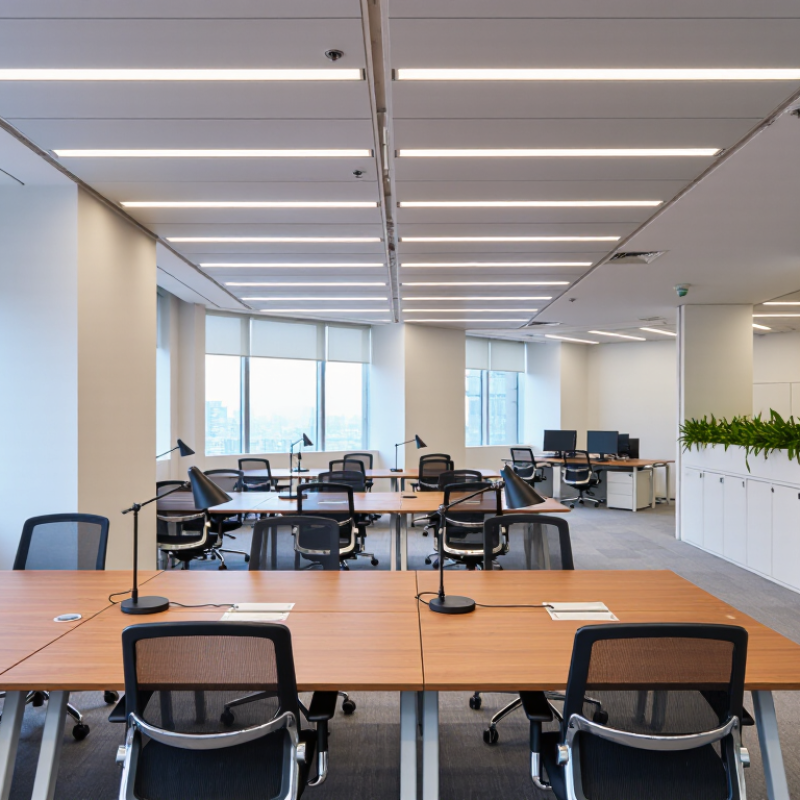
Modern office lighting design is the planned use of daylight and electric light to support work, comfort, and safe movement. It considers where light falls, how bright it feels, and whether screens or polished desks create distracting glare. It is not simply choosing attractive fixtures. Good light feels quiet.
The purpose is to help people read, write, meet, and move through a space without unnecessary eye strain. A designer may layer general ceiling light with task lighting near work surfaces and softer light in shared areas. For example, a desk beside a window may need adjustable blinds and a lamp, since daylight changes from morning to late afternoon. Controls can also let teams dim or switch zones instead of lighting an empty room.
A thoughtful plan balances brightness, color appearance, energy use, and individual needs. It accounts for ceiling height, screen placement, wall finishes, and the direction of incoming daylight. In practice, even a careful drawing can miss how a room feels on a cloudy day. That is why checking the space after installation matters. Small adjustments to lamp position or dimming levels can make a noticeable difference. There is no single setting that suits every person or task.
What Is Modern Office Lighting Design?
Core Principles for Visual Comfort and Productivity
Modern office lighting balances visibility, comfort, and control. A 2018 Future Workplace survey of 1,614 North American employees found that 78% said access to natural light and views improved their wellbeing; 70% said it improved their work performance. These are employee perceptions, not proof of cause, but they show why daylight deserves attention. Keep windows unobstructed where possible, and place monitors to limit reflections. Glare matters.
Layered lighting helps people shift between tasks. Use ambient light for general visibility, then add adjustable task lights for reading or detailed work. Choose diffusers and shielded fixtures to reduce bright points in the field of view. Follow applicable lighting standards, and measure conditions at desks rather than relying on fixture specifications alone. A tidy plan can still miss the afternoon sun hitting one workstation. It happens.
Tips: Check desk surfaces in the morning and late afternoon. Adjust blinds and task lights with employees, then revisit the setup after changes. Dimming controls are useful only when people can understand and reach them. Keep it simple.
Core principles for visual comfort and productivity
Typical maintained illuminance targets vary by activity: detailed desk work generally needs more light than filing or circulation. Good design also limits glare, balances daylight with electric lighting, and provides user controls. Values shown are indicative workplace recommendations based on EN 12464-1 guidance.
What Is Modern Office Lighting Design?
Types of Lighting Used in Modern Offices
Modern office lighting works best in layers, not as one bright ceiling grid. Ambient lighting provides a comfortable baseline across desks and walkways. Suspended linear fixtures can distribute light evenly, while indirect uplighting softens harsh ceiling contrast. The U.S. Energy Information Administration’s 2018 Commercial Buildings Energy Consumption Survey attributes about 17% of commercial-building electricity use to lighting. Efficient LEDs and occupancy or daylight controls can therefore support both comfort and energy management. But controls need careful setup; a poorly placed sensor may leave a desk unexpectedly dim.
Task lighting adds focused illumination for reading, writing, or detailed screen work. Adjustable desk lamps let people direct light onto paper without brightening the whole room. Accent lighting can highlight reception walls or shared spaces, though too much contrast may distract. Daylight is another useful layer. Blinds and glare-aware desk placement help soften direct sun on screens. Not everywhere. For many office tasks, IES guidance uses maintained illuminance near 500 lux at the workplane, while actual needs vary with the task, occupants, and room finishes.
| Lighting Type | Primary Purpose | Common Locations | Typical Illuminance at the Work Plane | Typical Color Temperature | Common Controls |
|---|---|---|---|---|---|
| Ambient (general) lighting | Provides balanced overall illumination so people can move around and perform general office tasks. | Open-plan offices, reception areas, meeting rooms | About 300–500 lux, adjusted for the task and room conditions | Usually 3500–4000 K | Dimming, occupancy sensing, daylight-responsive control |
| Task lighting | Supplies focused light for detailed work while allowing the overall room lighting to remain lower. | Desks, reading areas, design or inspection workstations | Often around 500 lux on the task area; higher levels may suit demanding visual tasks | Usually 3000–4000 K | Local dimmer or switch; adjustable position and beam direction |
| Indirect lighting | Reflects light from ceilings or walls to create a softer distribution and reduce direct glare. | Open offices, collaborative areas, rooms with suitable reflective surfaces | Varies by layout; commonly contributes to an overall target of about 300–500 lux | Usually 3000–4000 K | Dimming and scene control; output should be coordinated with surface reflectance |
| Direct or direct-indirect lighting | Delivers light toward desks, sometimes combining downward light with upward light for ceiling brightness. | Open-plan work areas, conference rooms, private offices | Often designed to support approximately 300–500 lux on work surfaces | Usually 3500–4000 K | Dimming, occupancy sensing, daylight harvesting |
| Accent lighting | Highlights architectural features, artwork, signage, or selected display areas rather than serving as the main work light. | Reception areas, corridors, display walls, shared spaces | Depends on the feature; typically higher than the surrounding surface to create visual emphasis | Commonly 2700–4000 K, selected to suit the space and materials | Separate switching, dimming, or scheduled scenes |
| Daylight and daylight-responsive lighting | Uses available natural light and adjusts electric lighting to maintain useful illumination as daylight changes. | Perimeter desks, window-side meeting areas, rooms with skylights | Daylight varies; electric lighting can supplement it to meet the room’s target level | Varies with time, weather, and glazing | Photosensors, dimming, glare-control shades |
| Tunable-white lighting | Allows the light’s color temperature, and sometimes intensity, to be adjusted for different tasks or room scenes. | Meeting rooms, flexible workspaces, presentation areas | Set according to the task, with general office levels commonly around 300–500 lux | Often adjustable across a range such as 2700–5000 K | Preset scenes, scheduled adjustment, manual controls |
Illuminance figures are practical planning ranges, not universal requirements. Final lighting levels and controls should be selected for the visual tasks, surface finishes, glare conditions, local standards, and needs of the people using the space.
Planning office lighting starts with observing how people use the room. Note window direction, screen positions, ceiling height, and darker corners before choosing fixtures. Visit at different times of day; a desk beside a bright window may feel comfortable in the morning and glaring by afternoon. Sketch the work areas, meeting tables, and walkways. Start with the work. General ceiling light should make movement easy, while adjustable task lights can brighten detailed work without lighting every surface equally.
Arrange lights to reduce reflections on screens and avoid placing a bright source directly behind a monitor. At each workstation, check the view from a seated position, then move the light or screen if glare persists.
Glare is stubborn.
Use daylight where practical, with blinds or shades to soften strong sun. Separate controls for different zones help staff adjust light levels without disturbing nearby teams. A simple light meter can reveal uneven brightness, but a careful walk-through matters too. A tidy plan can still miss how one person uses a space; test a few desks, ask for feedback, and make adjustments before repeating the layout.
Modern office lighting design is not just brighter ceilings. It combines task lighting, daylight, and controls that respond to how rooms are used. A Lawrence Berkeley National Laboratory meta-analysis found average lighting-energy savings of 24% from occupancy sensors and 28% from daylighting controls. These are study averages, not guarantees.
In practice, sensors can switch off lights in an empty meeting room, while daylight sensors dim fixtures near a window. Dimming helps avoid the stark contrast between a sunlit desk and a bright ceiling. It can also reduce glare on screens. Keep controls understandable: staff should know how to adjust their immediate workspace without disabling the whole system. Small detail. Poorly set sensors may frustrate people and get overridden.
Energy targets must work alongside visual comfort and applicable lighting standards. ASHRAE Standard 90.1 sets requirements for lighting power and controls in many commercial buildings; the adopted edition and local rules matter. The Illuminating Engineering Society’s task-based recommendations can help guide light levels for desks, circulation, and detailed work. Measure real conditions after installation, including daylight variation and screen reflections. A control strategy that looks efficient on a plan may feel uneven at 3 p.m. Sources: LBNL, A Meta-Analysis of Energy Savings from Lighting Controls in Commercial Buildings (2012); ASHRAE Standard 90.1; Illuminating Engineering Society recommendations.
Layer ambient, task, accent, and daylight. Ceiling lights support walkways, while desk lamps focus light on paper. Keep contrast gentle.
Around 500 lux at the work surface is a common reference for many office tasks. Actual needs vary with the work, room finishes, and occupants.
Avoid placing bright lights directly behind monitors. Check the screen from a seated position, then adjust the lamp or monitor. Glare can be stubborn.
Use blinds or shades to soften strong sunlight. A desk beside a window may feel pleasant in the morning and glaring later.
Occupancy sensors can switch off lights in empty rooms. Daylight sensors can dim fixtures near windows. Setup matters.
One research review found average savings of 24% from occupancy sensors and 28% from daylight controls. These are averages, not promises.
Walk through the space at different times, and check desks, meeting tables, and darker corners. Try a few workstations first. Ask staff what feels uneven.
Poorly placed sensors may leave a desk dim or switch lights off unexpectedly. Keep controls simple, and check real conditions after installation. Plans can miss things.
Modern office lighting design is the thoughtful use of natural and electric light to support comfort, focus, and wellbeing throughout the workday. It balances brightness, color temperature, and light distribution to reduce glare and eye strain while making different tasks easier. A well-lit office may combine ambient lighting for general visibility, task lighting for focused work, and accent lighting to add depth or highlight shared spaces.
Planning begins with the room’s layout, window positions, workstations, and the needs of the people using each area. Modern Office Lighting Design Ideas can include placing task lights where detailed work happens, using adjustable fixtures in flexible spaces, and making the most of daylight without creating harsh contrasts. Smart controls, such as dimming and occupancy-based settings, can help adapt lighting to changing needs and reduce energy use. Designers should also consider applicable lighting standards so spaces are comfortable, practical, and appropriately illuminated.

Cool Light